Tuesday, October 7, 2008

Level of accuracy

Want to create a very simple single flight stair like this:

image

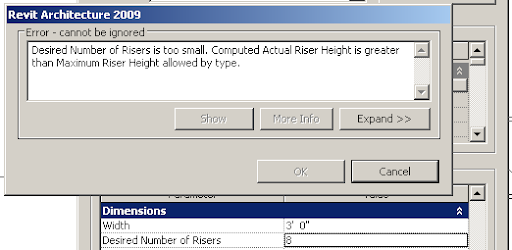
8 risers of 7" each that makes 4'-8". Perfect. But Revit kept giving this error message, when tried with 8 risers. 
image

It actually says "Desired number of Risers too small..."

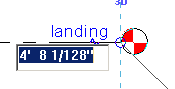
How can 8 risers be too small? Anyway, it turns out, when the accuracy of the levels was checked, it said.
image

Correcting this resolved the issue. Great!

Now, who is the culprit that actually entered such crazy dimension to that level?

Monday, October 6, 2008

Non-Align two attached walls

Very simple issue.

We have two dissimilar walls that are aligned look like this in plan:

image

image

We want to move one of the walls (brick) so that there is a 2" offset. But moving one of the walls, moves both the walls. Trying to align to a ref plane that is offset by 2", moves both the walls together too.

Selecting the wall, then selecting the Move command and then selecting the disjoin option in the option bar:

image

does the job.

image

Tuesday, September 30, 2008

Substitute / replace families

Good old AutoCAD has a method, with which, one can substitute a block with another block. For eg., you can use the insert command and then say "blockA = c:\blockb.dwg".

image

Revit has its own family substitution. For eg., you have a Single Flush Door family in your project with various sizes (types): 36", 30" and 42".  During DD, transoms are added for all the single Flush doors. To make this correction in the model, there are (atleast) three roundabout methods and one quicker method:

  1. You can edit the Single Flush Door family and add a transom. But you already have another family in the library with the transom.
  2. You can load the transom door family from the library and then "select all instances" of the single flush door by each type and swap them with the transom door family. This is a long process and this also may require you to create the corresponding types in the the transom door family.
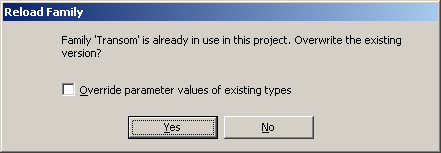
  3. Another method would be to rename the Single Flush Door family in the project browser to the transom door family and then load the transom door family from the library to override the existing version like
    image
    This approach brings the new door family and keeps the various types that are already present (36", 30" and 42") in the project intact.
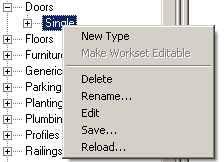
  4. Better yet, Revit has an inbuilt functionality to do this. Right click on the Single Flush Door family in the project browser and select "Reload...";
    image
    Select the transom door family; revit asks you permission to override and automatically renames the family and also keeps the family types intact!

Tuesday, September 23, 2008

View Filter differences in 2008 and 2009

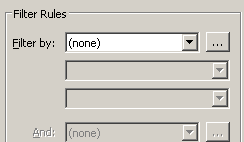
View filters behave a bit different in 2008 and 2009. We have a filter called "Filtered Objects" in our template that applies to all categories and which is Filtered By based on the following Filter Rule in RAC 2008. (ScheduleSorter Project parameter equals <nul> or any other value)

image

When opened in RAC 2009, the filter changes to:

image

This can cause quite a confusion, especially if the filter is used to turn on/off the visibility of the objects... based on the unwanted behavior, it can switch off all the objects in view when opened in 2009!!!

I will report this to Autodesk.

Monday, September 22, 2008

Schedule tips

Interesting thing I came across in Revit Help on Schedules today.

"Mouse-wheel scrolling is available in schedule views. Move the mouse wheel to scroll vertically. Hold SHIFT and move the wheel to scroll horizontally."

Horizontal movement is interesting!

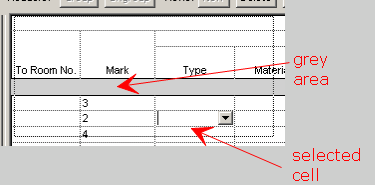
Also, the vertical scrolling does not work if a cell is selected. (Horizontal still works!)
image

You have to unselect the cell by clicking on the "grey area" or select more than one cell (by clicking on one and dragging) for vertical scrolling to work.