Showing posts with label design option. Show all posts

Tuesday, September 16, 2008

Design Option Visual clues

Revit comes with a lot of visual clues to represent various modes. For eg., the reveal hidden elements mode is shown like
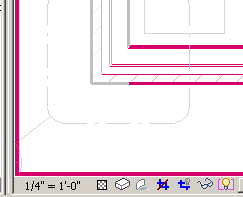
image

The temporary hide / isolate mode is like
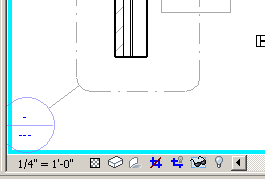
image

Group edit mode is like

image

However, Design option edit more just grey out the objects that don't belong in the design option.
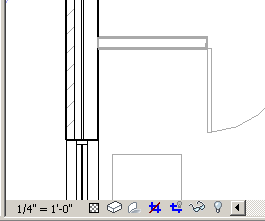
image

Since greying out (screening out) of objects are used in architectural drawing to denote phases, existing condition, etc., a better visual clue with a border like temp hide / reveal hidden will help a lot. It will be even better if the border came up with a name of the design option being edited.

Revit help says:

To determine whether you are currently in Design Option Edit mode, check the Editing button of the Design Options toolbar.  If it appears to be pressed (instead of raised), you are in Design Option Edit mode.....To determine which design option is currently active for editing, move the mouse over the Editing button. It displays a tooltip that indicates the active option, using the following format

I wish there was a better clue.

Tuesday, May 20, 2008

Design options and linked Revit Files

I was at a seminar presented by Phil Read the other day. He mentioned about using linked revit files to create design options. This seems like a very good idea.

The problems we have had with Design Options is that once we choose an option over other, Revit deletes everything related to the deleted option. Design Options also had its own rules and complicated the main project file with lots of views, objects, etc. Creating new central files out of the project to make 4 or 5 design option seemed to work ok, as long as the main project file is NOT concurrently developed.

Linking a separate RVT file as a design option does not clutter the main project file. It allows the main project file to be developed concurrently. After finalizing the option, we can just convert the linked file into a Group! (The new Revit 2009 feature of the linked RVT file being able to define a room, is a great improvement!) We can keep the other design option, even after we select the favorite one!

May be one day Autodesk will do away with the Design Option?!