Showing posts with label elevation. Show all posts

Monday, March 23, 2009

Show Meters in Level Dimensions

If the project is in MM and you want to show the dimensions in M in certain views, you can create a new dimension type that has its units set as M.

However, to change the Level dimensions in Elevation views to show in Meters, you have to edit the Level head family (look for it in the Project Browser > Families > Annotation Symbols > Level Head…).

image

In the family editor, select the ‘Elevation’ label and select in the ‘Edit Label’ button in the option bar.

image

Select the Elevation parameter in the RIGHT side of the Edit Label dialog box. (If you select the label in the LEFT side, the “Edit parameters Unit format” button - small hand like thing at the bottom – won’t become available.

image

In the format dialog box, you can uncheck the ‘Use project settings’ and change the units.

image

Monday, July 21, 2008

Remove view names from Interior elevation tags

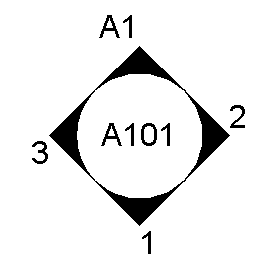
The Interior elevation tag in the default template in Revit shows the view name for some reason. As far as I know, most of the offices don't require this.

image

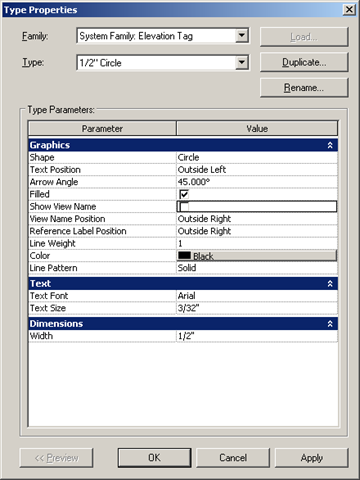
To change this, go to Settings menu > view tags > elevations tags. Then select the 1/2" circle type (which is the type used for interior elevations). Uncheck the 'Show view name' parameter.

image

When you hit apply, the elevation tag becomes:

image

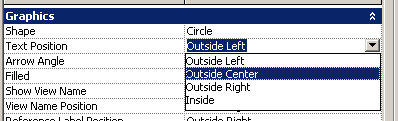
To center the text, change the Text Position parameter to Outside center.

image

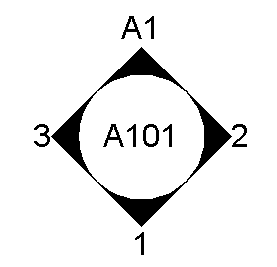
The elevation tag looks like this now:

image

It is better to make this modification in the default template, so that this setting need not be changed in new projects.

Tuesday, March 4, 2008

Dependent views conversion changes

A dependent elevation or dependent section view cannot have its own view depth / cut plane. (This is true for the plan views also, however, because we don’t get a separate view tag for the plan views, there is less confusion there) Dependent views of elevation / sections have their own view tags, and the cut plane and view depth are visible, but cannot be edited! To change the view depth or cut plane of the dependent elevation / section, you have to change the view depth / cutplane of the parent view.
To convert a dependent view to an independent view, right click on the view in the Project browser, and select "Convert to Independent"